DD-WRT with CA Signed certificate, bundle and key

Surprisingly enough, finding new documentation on DD-WRT, with a custom certificate, is difficult.
Yes, there is information around, however it\u2019s date years old which doesn\u2019t inspire a lot of confidence.

Login to your DD-WRT front end.
Go to Management -> commands.

In the commands box, paste your keys like so.
Finally at the bottom choose \u2018save startup\u2019 and your are done.
If you are concerned about it going wrong, you can run it interactively on the console first to test \ud83d\ude42

Enjoy

#!/bin/sh 

cat <<EOF > /tmp/key.pem
-----BEGIN RSA PRIVATE KEY-----
## YOUR PRIVATE KEY HERE ##
-----END RSA PRIVATE KEY-----
EOF

cat <<EOF > /tmp/cert.pem
-----BEGIN CERTIFICATE-----
## YOUR CERTIFICATE HERE ##
-----END CERTIFICATE-----
-----BEGIN CERTIFICATE-----
## YOUR INTERMEDIATE CERTIFICATE HERE ##
-----END CERTIFICATE-----
EOF

mount -o bind /tmp/cert.pem /etc/cert.pem 
mount -o bind /tmp/key.pem /etc/key.pem 

stopservice httpd 
startservice httpd
Golang script to pull bandwidth usage from digiweb

I wrote the following script to pull broadband usage form digiweb.

Its fairly hilarious that digiweb are so badly organized.
They are still using smart telecom forums for customers to access pertinent data.
Furthermore the connection is http rather than https.

Here’s to passing un-encrypted passwords over the wire! 🙂

Digiweb figures are exactly 10% more that what DD-WRT reports. Interesting observation 😉

Enjoy 😉

package main

import (
    "fmt"
    "strconv"
    "net/http"
    "net/http/cookiejar"
    "crypto/tls"
    "io/ioutil"
    "crypto/md5"
    "encoding/hex"
    "net/url"
    "strings"
    "regexp"
)

var _smart_username = "username"
var _smart_password = "password"
var _modem_username = "0123456789"
var _modem_password = "password"
var _forum_endpoint = "http://support.smarttelecom.ie/forums/login.php?do=login"
var _usage_endpoint = "http://support.smarttelecom.ie/forums/smart_usage"

func GetMD5Hash(text string) string {
    hasher := md5.New()
    hasher.Write([]byte(text))
    return hex.EncodeToString(hasher.Sum(nil))
}

func getusage() {
    tr := &http.Transport {
        TLSClientConfig: &tls.Config { InsecureSkipVerify: true },
    }
    
    cookieJar, _ := cookiejar.New(nil)

    client1 := &http.Client { Transport: tr, Jar: cookieJar }
    
    form1 := url.Values{}
    form1.Add( "vb_login_username", _smart_username )
    form1.Add( "vb_login_password", "" )
    form1.Add( "s", "" )
    form1.Add( "securitytoken", "guest" )
    form1.Add( "do", "login" )
    form1.Add( "vb_login_md5password", GetMD5Hash( _smart_password ) )
    form1.Add( "vb_login_md5password_utf", GetMD5Hash( _smart_password ) )
    
    //fmt.Printf("%s", GetMD5Hash(_smart_password))
    
    req1, err := http.NewRequest( "POST", _forum_endpoint, strings.NewReader(form1.Encode()) )
    req1.Header.Add( "Content-Type", "application/x-www-form-urlencoded" )
    
    resp1, err := client1.Do( req1 )
    defer resp1.Body.Close()

    if err != nil {
        fmt.Printf( "Error : %s", err)
    }

    if resp1.StatusCode != 200 {
        fmt.Printf( "Error code: %s", strconv.Itoa( resp1.StatusCode ) )
    }
    
            
    client2 := &http.Client { Transport: tr, Jar: cookieJar }
    
    form2 := url.Values{}
    form2.Add( "user", _modem_username )
    form2.Add( "pass", _modem_password )
    form2.Add( "submit", "SUBMIT" )
    
    req2, err := http.NewRequest( "POST", _usage_endpoint, strings.NewReader(form2.Encode()) )
    req2.Header.Add( "Content-Type", "application/x-www-form-urlencoded" )
    
    resp2, err := client2.Do( req2 )
    defer resp2.Body.Close()
    
    if err != nil {
        fmt.Printf( "Error : %s", err)
    }

    if resp1.StatusCode != 200 {
        fmt.Printf( "Error code: %s", strconv.Itoa( resp1.StatusCode ) )
    }    

    bodyBytes2, err := ioutil.ReadAll( resp2.Body )
    if err != nil {
        fmt.Printf( "Error : %s", err )
    }
    
    //fmt.Printf( "%s\n", bodyBytes2 )
    
    re := regexp.MustCompile( "(?s)<table width=800 border=\"0\" style=\"border-collapse:collapse;\" cellspacing=\"0\">(.*)</table>" )
    matches := re.FindAllString( string(bodyBytes2), -1 )
        
    for i := len( matches )-1; i >= 0; i-- {
        reinout := regexp.MustCompile( "(?s)<td>(.*?)</td>" )
        inout := reinout.FindAllString( matches[i] , -1 )
        
        //fmt.Printf( "%v\n", inout[0][4:len(inout[0])-5] )
        //fmt.Printf( "%v\n", inout[1][4:len(inout[1])-5] )
        //fmt.Printf( "%v\n", inout[2][4:len(inout[2])-5] )
        //fmt.Printf( "%v\n", inout[3][4:len(inout[3])-5] )
        //fmt.Printf( "%v\n", inout[4][4:len(inout[4])-5] )
        //fmt.Printf( "%v\n", inout[5][4:len(inout[5])-5] )
        //fmt.Printf( "%v\n", inout[6][4:len(inout[6])-5] )
        //fmt.Printf( "%v\n", inout[7][4:len(inout[7])-5] )
        //fmt.Printf( "%v\n", inout[8][4:len(inout[8])-5] )
        //fmt.Printf( "%v\n", inout[9][4:len(inout[9])-5] )
        //fmt.Printf( "%v\n", inout[10][4:len(inout[10])-5] )
        
        i := strings.Index(inout[11], "(") + 1
        fmt.Printf( "%v\n", inout[11][i:len(inout[11])-10] )       
        
    }
}


func main() {
    getusage()
}

Golang DD-WRT Bandwidth Usage with Conky

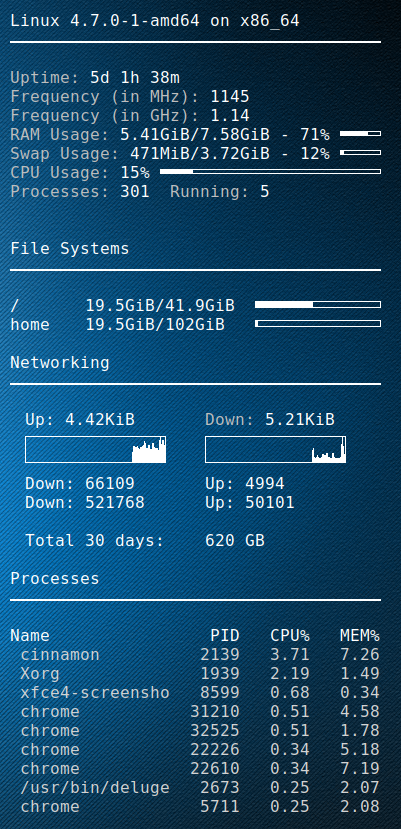
I setup a golang script to fetch the DD-WRT bandwidth usage for the previous 2 months, as well as the last 30 days(rolling).
Using conky then i can display it on my desktop.
My ISP (digiweb), don’t provide any means to check your bandwidth.
Picture at end of post 🙂

Golang DD-WRT script


package main

import (
    "fmt"
    "strconv"
    "net/http"
    "crypto/tls"
    "io/ioutil"
    "regexp"
    "time"
)

// You set these
var _ddwrt_ip = "10.1.1.1"
var _ddwrt_ssl = true
var _ddwrt_port = 443
var _ddwrt_user = "root"
var _ddwrt_pass = "password"

// don't set these
var _ddwrt_this_month = ""
var _ddwrt_last_month = ""

func printmonth(monthyear string) {
    tr := &http.Transport {
        TLSClientConfig: &tls.Config { InsecureSkipVerify: true },
    }

    client := &http.Client { Transport: tr }

    proto := "http"
    if _ddwrt_ssl == true {
      proto = "https"
    }

    req, err := http.NewRequest( "GET", proto + "://" + _ddwrt_ip + ":" + strconv.Itoa( _ddwrt_port ) + "/ttgraph.cgi?" + monthyear, nil )
    req.SetBasicAuth( _ddwrt_user, _ddwrt_pass )

    resp, err := client.Do( req )
    defer resp.Body.Close()

    if err != nil {
        fmt.Printf( "Error : %s", err)
    }

    if resp.StatusCode != 200 {
        fmt.Printf( "Error code: %s", strconv.Itoa( resp.StatusCode ) )
    }

    bodyBytes, err2 := ioutil.ReadAll( resp.Body )
    if err2 != nil {
        fmt.Printf( "Error : %s", err2 )
    }
    
    if len( _ddwrt_this_month ) == 0 {
        _ddwrt_this_month = string( bodyBytes )
    } else {
        _ddwrt_last_month = string( bodyBytes )
    }

    re := regexp.MustCompile( "(?s)<li id=\"label\">(.*?)</li>" )
    matches := re.FindAllString( string( bodyBytes ), -1 )

    rein := regexp.MustCompile( "(?s)Incoming: ([0-9]+)" )
    reinmatches := rein.FindStringSubmatch( matches[0] )

    reout := regexp.MustCompile( "(?s)Outgoing: ([0-9]+)" )
    reoutmatches := reout.FindStringSubmatch( matches[0] )

    fmt.Printf( "${goto 20}Down: %s ${goto 200}Up: %s\n", reinmatches[1], reoutmatches[1] )
}

func parse30days() {
    
    var all = _ddwrt_last_month + _ddwrt_this_month
    
    re := regexp.MustCompile( "(?s)onmouseover=\"Show(.*?)onmouseout" )
    matches := re.FindAllString( all, -1 )
    
    var down int64
    var up int64
    var total int64
    var days30 = 30
    
    for i := len( matches )-1; i >= 0; i-- {
        reinout := regexp.MustCompile( "(?s)Incoming: ([0-9]+) MB / Outgoing: ([0-9]+) MB" )
        inout := reinout.FindStringSubmatch( matches[i] )
        r, _ := strconv.ParseInt( inout[1], 10, 64 )
        
        if r == 0 {
            continue;
        }
        
        down = down + r
        
        t, _ := strconv.ParseInt( inout[2], 10, 64 )
        up = up + t
        
        days30--
        
        if days30 == 0 {
           break;
        }
    }

    
    total = down + up
    fmt.Printf( "\n${goto 20}Total 30 days:${goto 200}%d GB\n", total / 1024 )
}

func main() {
    now := time.Now()
    monthyear := now.Format("01-2006")
    printmonth(monthyear)
    monthyear = now.AddDate(0,-1,0).Format("01-2006")
    printmonth(monthyear)
    parse30days()
}

Conky script Integration


conky.config = {
    alignment = 'top_right',
    background = true,
    border_width = 1,
    cpu_avg_samples = 2,
	default_color = 'white',
    default_outline_color = 'white',
    default_shade_color = 'white',
    draw_borders = false,
    draw_graph_borders = true,
    draw_outline = false,
    draw_shades = false,
    use_xft = true,
    font = 'DejaVu Sans Mono:size=12',
    gap_x = 50,
    gap_y = 50,
    double_buffer = true,
    minimum_height = 5,
	minimum_width = 5,
    net_avg_samples = 2,
    no_buffers = true,
    out_to_console = false,
    out_to_stderr = false,
    extra_newline = false,
    own_window = true,
    own_window_class = 'Conky',
    own_window_type = 'desktop',
    own_window_transparent = true,
    stippled_borders = 0,
    update_interval = 3.0,
    uppercase = false,
    use_spacer = 'none',
    show_graph_scale = false,
    show_graph_range = false
}

conky.text = [[
$sysname $kernel on $machine
${hr 2}

${color grey}Uptime:$color $uptime
${color grey}Frequency (in MHz):$color $freq
${color grey}Frequency (in GHz):$color $freq_g
${color grey}RAM Usage:$color $mem/$memmax - $memperc% ${membar 4}
${color grey}Swap Usage:$color $swap/$swapmax - $swapperc% ${swapbar 4}
${color grey}CPU Usage:$color $cpu% ${cpubar 4}
${color grey}Processes:$color $processes  ${color grey}Running:$color $running_processes


${color}File Systems
${hr 2}

/${goto 80}$color${fs_used /}/${fs_size /} ${goto 250}${fs_bar 6 /}
/home${goto 80}$color${fs_used /}/${fs_size /home} ${goto 250}${fs_bar 6 /home}
 
${color}Networking
${hr 2}

${goto 20}Up:$color ${upspeed wlp3s0} ${goto 200}${color grey}Down:$color ${downspeed wlp3s0}
${goto 20}${upspeedgraph wlp3s0 26,140 FFFFFF FFFFFF}${goto 200}${downspeedgraph wlp3s0 26,140 FFFFFF FFFFFF}
${execpi 3600 /usr/bin/go run /home/dave/.conky/ddwrt-bandwidth.go}

${color}Processes
${hr 2}

Name                PID   CPU%   MEM%
${color lightgrey} ${top name 1} ${top pid 1} ${top cpu 1} ${top mem 1}
${color lightgrey} ${top name 2} ${top pid 2} ${top cpu 2} ${top mem 2}
${color lightgrey} ${top name 3} ${top pid 3} ${top cpu 3} ${top mem 3}
${color lightgrey} ${top name 4} ${top pid 4} ${top cpu 4} ${top mem 4}
${color lightgrey} ${top name 5} ${top pid 5} ${top cpu 5} ${top mem 5}
${color lightgrey} ${top name 6} ${top pid 6} ${top cpu 6} ${top mem 6}
${color lightgrey} ${top name 7} ${top pid 7} ${top cpu 7} ${top mem 7}
${color lightgrey} ${top name 8} ${top pid 8} ${top cpu 8} ${top mem 8}
${color lightgrey} ${top name 9} ${top pid 9} ${top cpu 9} ${top mem 9}

]]

Enjoy
rolling


Debian SID Opendmarc Installation and Configuration

In this post i will capture the installation of opendmarc and how its configure alongside Opendkim.

Install opendmarc

apt-get install opendmarc

Configure systemd service file

cat > /lib/systemd/system/opendkim.service <<EOT
[Unit]
Description=OpenDMARC Milter
Documentation=man:opendmarc(8) man:opendmarc.conf(5)
After=network.target nss-lookup.target 

[Service]
EnvironmentFile=/etc/default/opendmarc
Type=forking
PIDFile=/var/run/opendmarc/opendmarc.pid
User=opendmarc
ExecStart=/usr/sbin/opendkim -p $SOCKET -x /etc/opendmarc.conf -u opendmarc -P /var/run/opendmarc/opendmarc.pid
Restart=on-failure
ExecReload=/bin/kill -USR1 $MAINPID

[Install]
WantedBy=multi-user.target
EOT

The specific changes here are lines #9 EnvironmentFile #13 -p $SOCKET

Defaults File

cat > /etc/default/opendmarc <<EOT
SOCKET="inet:12302@localhost"
EOT

Opendmarc Config file

cat > /etc/opendmarc.conf <<EOT
AuthservID example.com
PidFile /var/run/opendmarc.pid
#RejectFailures false
Syslog true
SyslogFacility mail
UMask 0002
UserID opendmarc:opendmarc
TemporaryDirectory /tmp
AutoRestart true
EOT

Modify Postfix milters

If you are running both opendkim and opendmarc your milters will look like this:

non_smtpd_milters = inet:127.0.0.1:12301, inet:127.0.0.1:12302
smtpd_milters = inet:127.0.0.1:12301, inet:127.0.0.1:12302

Restart the service

systemctl daemon-reload
systemctl restart opendmarc
systemctl restart postfix

DNS

Now go modify your DNS, adding a TXT record ‘_dmarc‘with the value ‘v=DMARC1; p=none; rua=mailto:postmaster@example.com

When you have validated dmarc is working properly you can change p=none to p=reject

How can you validate it?

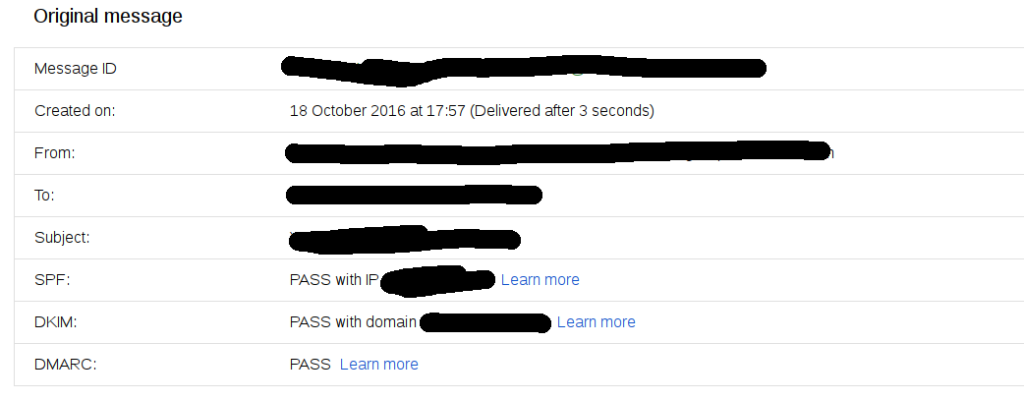
There are a number of tools online to help you with this, also you open up a mail in google and click ‘show original’.

screenshot_2016-11-20_12-32-23

Enjoy

Other resources

https://www.google.com/search?q=opendkim+setup

https://www.google.com/search?q=opendmarc+setup


Debian SID Opendkim Installation and Configuration Woes

TL;DR Opendkim. Hats off the to folk who do marvelous packing 99.99999% percent of the time.

But sometimes they just get it wrong or at least all documentation regarding the package, does not match up with the behavior the packager intended.
That said, hopefully i will help solve some of these issues here.

I assume you have postfix already working and you are just looking to add dkim support.

Install opendkim

apt-get install opendkim opendkim-tools

Configure systemd service file

cat > /lib/systemd/system/opendkim.service <<EOT
[Unit]
Description=OpenDKIM DomainKeys Identified Mail (DKIM) Milter
Documentation=man:opendkim(8) man:opendkim.conf(5) man:opendkim-genkey(8) man:opendkim-genzone(8) man:opendkim-testadsp(8) man:opendkim-testkey http://www.opendkim.org/docs.html
After=network.target nss-lookup.target 

[Service]
EnvironmentFile=/etc/default/opendkim
Type=forking
PIDFile=/var/run/opendkim/opendkim.pid
User=opendkim
ExecStart=/usr/sbin/opendkim -P /var/run/opendkim/opendkim.pid -p $SOCKET
Restart=on-failure
ExecReload=/bin/kill -USR1 $MAINPID

[Install]
WantedBy=multi-user.target
EOT

The specific changes here are lines #9 EnvironmentFile #13 -p $SOCKET

Defaults File

cat > /etc/default/opendkim <<EOT
SOCKET="inet:12301@localhost"
EOT

Opendkim Config file

cat > /etc/opendkim <<EOT
Mode                sv
Syslog              yes
SyslogSuccess       yes
LogWhy              yes
#Socket              inet:12301@localhost
Umask               002
SendReports         yes
SoftwareHeader      yes
Canonicalization    relaxed/relaxed
Selector            default
MinimumKeyBits      1024
KeyTable            refile:/etc/dkimkeys/KeyTable
SigningTable        refile:/etc/dkimkeys/SigningTable
ExternalIgnoreList  refile:/etc/dkimkeys/TrustedHosts
OversignHeaders     From
TrustAnchorFile     /usr/share/dns/root.key
EOT

Specific changes here are lines #7 hashed out socket file,  it simply does not work.
The only way to get opendkim to honour this setting is passing it to the command line #13 of the service file.

Modify /etc/postfix/main.cf and add/edit the following lines

smtpd_milters = inet:localhost:12301
non_smtpd_milters = inet:localhost:12301

Create referenced folders for your open dkim keys

mkdir -vp /etc/dkimkeys/keys

TrustedHosts

cat > /etc/dkimkeys/TrustHosts <<EOT
127.0.0.1
::1
localhost
example.com
*.exmaple.com
EOT

SingingTable

cat > /etc/dkimkeys/SigningTable <<EOT
*@exmaple.com default._domainkey.example.com
EOT

KeyTable

cat> /etc/dkimkeys/KeyTable <<EOT
default._domainkey.example.com example.com:default:/etc/dkimkeys/keys/default.private
EOT

Create private/public key for signing

cd /etc/dkimkeys/keys
opendkim-genkey -s default

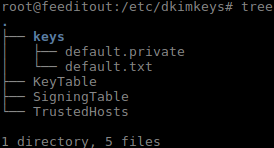
Your directory should now look like this

Opendkim Treeview of files

Tell systemd to reload the the daemon files and restart

systemctl daemon-reload
systemctl restart opendkim
systemctl restart postfix

DNS

Now go modify your DNS, adding a TXT record ‘default._domainkey’.
Copy and paste everything between the parenthesis. ( everything here ) into the value field of the TXT record

cat keys/default.txt 
default._dkim   IN      TXT     ( "v=DKIM1; k=rsa; "
          "p=MIGfMA0GCSqGSIGNA....BIG LONG DIRTY HASH ....ciaxOhS24T4MFwIDAQAB" )  ; ----- DKIM key default for com

Enjoy

Other resources
https://www.google.com/search?q=opendkim+setup