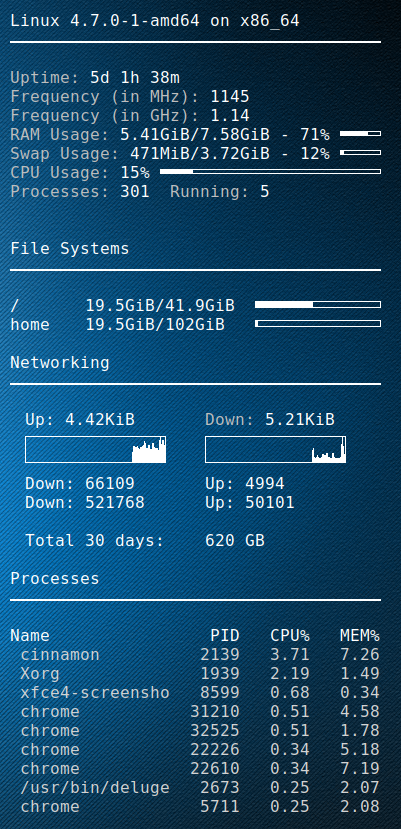
I setup a golang script to fetch the DD-WRT bandwidth usage for the previous 2 months, as well as the last 30 days(rolling).
Using conky then i can display it on my desktop.
My ISP (digiweb), don’t provide any means to check your bandwidth.
Picture at end of post 🙂
Golang DD-WRT script
package main

import (
    "fmt"
    "strconv"
    "net/http"
    "crypto/tls"
    "io/ioutil"
    "regexp"
    "time"
)

// You set these
var _ddwrt_ip = "10.1.1.1"
var _ddwrt_ssl = true
var _ddwrt_port = 443
var _ddwrt_user = "root"
var _ddwrt_pass = "password"

// don't set these
var _ddwrt_this_month = ""
var _ddwrt_last_month = ""

func printmonth(monthyear string) {
    tr := &http.Transport {
        TLSClientConfig: &tls.Config { InsecureSkipVerify: true },
    }

    client := &http.Client { Transport: tr }

    proto := "http"
    if _ddwrt_ssl == true {
      proto = "https"
    }

    req, err := http.NewRequest( "GET", proto + "://" + _ddwrt_ip + ":" + strconv.Itoa( _ddwrt_port ) + "/ttgraph.cgi?" + monthyear, nil )
    req.SetBasicAuth( _ddwrt_user, _ddwrt_pass )

    resp, err := client.Do( req )
    defer resp.Body.Close()

    if err != nil {
        fmt.Printf( "Error : %s", err)
    }

    if resp.StatusCode != 200 {
        fmt.Printf( "Error code: %s", strconv.Itoa( resp.StatusCode ) )
    }

    bodyBytes, err2 := ioutil.ReadAll( resp.Body )
    if err2 != nil {
        fmt.Printf( "Error : %s", err2 )
    }

    if len( _ddwrt_this_month ) == 0 {
        _ddwrt_this_month = string( bodyBytes )
    } else {
        _ddwrt_last_month = string( bodyBytes )
    }

    re := regexp.MustCompile( "(?s)<li id=\"label\">(.*?)</li>" )
    matches := re.FindAllString( string( bodyBytes ), -1 )

    rein := regexp.MustCompile( "(?s)Incoming: ([0-9]+)" )
    reinmatches := rein.FindStringSubmatch( matches[0] )

    reout := regexp.MustCompile( "(?s)Outgoing: ([0-9]+)" )
    reoutmatches := reout.FindStringSubmatch( matches[0] )

    fmt.Printf( "${goto 20}Down: %s ${goto 200}Up: %s\n", reinmatches[1], reoutmatches[1] )
}

func parse30days() {

    var all = _ddwrt_last_month + _ddwrt_this_month

    re := regexp.MustCompile( "(?s)onmouseover=\"Show(.*?)onmouseout" )
    matches := re.FindAllString( all, -1 )

    var down int64
    var up int64
    var total int64
    var days30 = 30

    for i := len( matches )-1; i >= 0; i-- {
        reinout := regexp.MustCompile( "(?s)Incoming: ([0-9]+) MB / Outgoing: ([0-9]+) MB" )
        inout := reinout.FindStringSubmatch( matches[i] )
        r, _ := strconv.ParseInt( inout[1], 10, 64 )

        if r == 0 {
            continue;
        }

        down = down + r

        t, _ := strconv.ParseInt( inout[2], 10, 64 )
        up = up + t

        days30--

        if days30 == 0 {
           break;
        }
    }


    total = down + up
    fmt.Printf( "\n${goto 20}Total 30 days:${goto 200}%d GB\n", total / 1024 )
}

func main() {
    now := time.Now()
    monthyear := now.Format("01-2006")
    printmonth(monthyear)
    monthyear = now.AddDate(0,-1,0).Format("01-2006")
    printmonth(monthyear)
    parse30days()
}
Conky script Integration
conky.config = {
    alignment = 'top_right',
    background = true,
    border_width = 1,
    cpu_avg_samples = 2,
	default_color = 'white',
    default_outline_color = 'white',
    default_shade_color = 'white',
    draw_borders = false,
    draw_graph_borders = true,
    draw_outline = false,
    draw_shades = false,
    use_xft = true,
    font = 'DejaVu Sans Mono:size=12',
    gap_x = 50,
    gap_y = 50,
    double_buffer = true,
    minimum_height = 5,
	minimum_width = 5,
    net_avg_samples = 2,
    no_buffers = true,
    out_to_console = false,
    out_to_stderr = false,
    extra_newline = false,
    own_window = true,
    own_window_class = 'Conky',
    own_window_type = 'desktop',
    own_window_transparent = true,
    stippled_borders = 0,
    update_interval = 3.0,
    uppercase = false,
    use_spacer = 'none',
    show_graph_scale = false,
    show_graph_range = false
}

conky.text = [[
$sysname $kernel on $machine
${hr 2}

${color grey}Uptime:$color $uptime
${color grey}Frequency (in MHz):$color $freq
${color grey}Frequency (in GHz):$color $freq_g
${color grey}RAM Usage:$color $mem/$memmax - $memperc% ${membar 4}
${color grey}Swap Usage:$color $swap/$swapmax - $swapperc% ${swapbar 4}
${color grey}CPU Usage:$color $cpu% ${cpubar 4}
${color grey}Processes:$color $processes  ${color grey}Running:$color $running_processes


${color}File Systems
${hr 2}

/${goto 80}$color${fs_used /}/${fs_size /} ${goto 250}${fs_bar 6 /}
/home${goto 80}$color${fs_used /}/${fs_size /home} ${goto 250}${fs_bar 6 /home}

${color}Networking
${hr 2}

${goto 20}Up:$color ${upspeed wlp3s0} ${goto 200}${color grey}Down:$color ${downspeed wlp3s0}
${goto 20}${upspeedgraph wlp3s0 26,140 FFFFFF FFFFFF}${goto 200}${downspeedgraph wlp3s0 26,140 FFFFFF FFFFFF}
${execpi 3600 /usr/bin/go run /home/dave/.conky/ddwrt-bandwidth.go}

${color}Processes
${hr 2}

Name                PID   CPU%   MEM%
${color lightgrey} ${top name 1} ${top pid 1} ${top cpu 1} ${top mem 1}
${color lightgrey} ${top name 2} ${top pid 2} ${top cpu 2} ${top mem 2}
${color lightgrey} ${top name 3} ${top pid 3} ${top cpu 3} ${top mem 3}
${color lightgrey} ${top name 4} ${top pid 4} ${top cpu 4} ${top mem 4}
${color lightgrey} ${top name 5} ${top pid 5} ${top cpu 5} ${top mem 5}
${color lightgrey} ${top name 6} ${top pid 6} ${top cpu 6} ${top mem 6}
${color lightgrey} ${top name 7} ${top pid 7} ${top cpu 7} ${top mem 7}
${color lightgrey} ${top name 8} ${top pid 8} ${top cpu 8} ${top mem 8}
${color lightgrey} ${top name 9} ${top pid 9} ${top cpu 9} ${top mem 9}

]]
Enjoy