
Category: Linux

Seedbox autoupload to google drive with rclone

If you are an avid seedbox user, here is another option for automatic uploads to google drive.
There are many ways of achieving this, including a cronjob.
I like this option, as it only runs rclone when a torrent completes.

Using inotifywait to watch for file system events, we look out for primarily the \u2018move\u2019 event.
When your torrent completes, it moves the completed torrent into the completed folder.
When this event takes place, when then execute rcopy.sh

Setup rclone and scripts

mkdir ~/bin
cd ~/bin
wget https://downloads.rclone.org/rclone-v1.38-linux-amd64.zip
unzup rclone-v1.38-linux-amd64.zip
mv rclone*/* .

rscreen.sh

#!/bin/bash -x

ScSess=$(screen -ls)

if [[ $ScSess == *"No Sockets found"* ]]; then
  killall -9 rclone
  rm -rf ~/bin/rcopy.sh.lock
  screen -dmS rwait ~/bin/rwait.sh 
else
  exit
fi

rwait.sh

#!/bin/bash -x

COMPLETED_TORRENTS=~/private/deluge/completed/

while true; do
  inotifywait -r -e modify,attrib,move,close_write,create,delete,delete_self $COMPLETED_TORRENTS
  ~/bin/rcopy.sh
done

rcopy.sh

#!/bin/bash -x
#!/bin/bash -x

COMPLETED_TORRENTS=~/private/deluge/completed/

if [ -f "~/bin/rcopy.sh.lock" ]; then
  exit
else
  touch ~/bin/rcopy.sh.lock
  ~/bin/rclone --config=~/.config/rclone/rclone.conf --verbose --transfers=8 copy "$COMPLETED_TORRENTS" "google:/unsorted/"
  rm -f ~/bin/rcopy.sh.lock
fi

Permissions and PATH

Once you have setup the 3 scripts, make them executable

Permissions

chmod +x ~/bin/*

If ~/bin is not in your path, then add it and reload your shell

Edit Path

echo "PATH=~/bin:\$PATH" >> ~/.bashrc
source ~/.bashrc

Finally you run the main script in a cronjob

Finalize and run in the background

Screen session

*/1 * * * * /media/sdf1/feeditout/bin/rscreen.sh >/dev/null 2>&1

You can read more about inotifywait and rclone here
https://linux.die.net/man/1/inotifywait
https://rclone.org/
PyGTK Threaded Nautilus Filebot

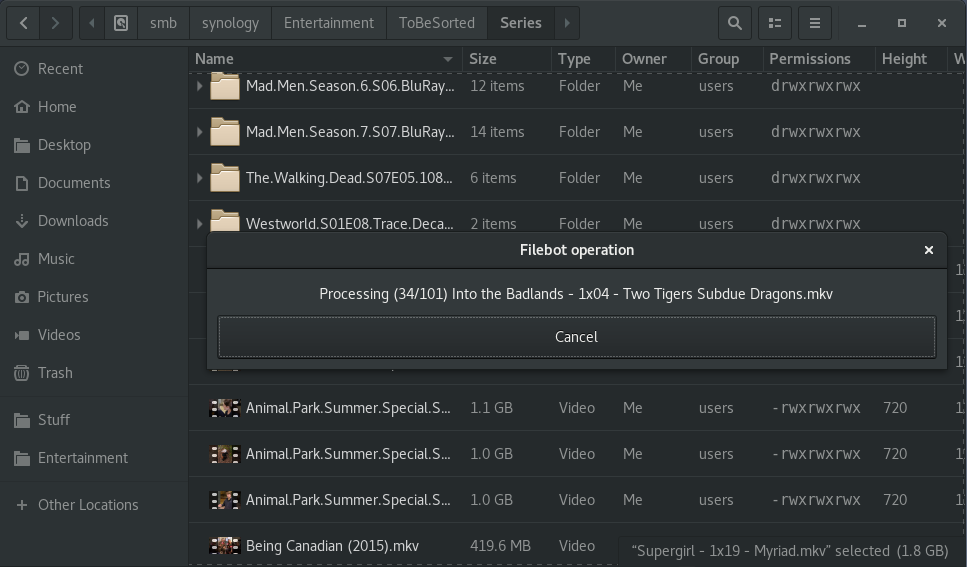
As a heavy user of Nautilus and Filebot, i decided to integrate the two.
Following on from my previous article on column providers for nautilus, here as the additional functionality for nautilus filebot integration.
Its a basic threaded extension; for the most basic and most used operation, \u201cStrict file renaming\u201d.

It solves 95% of my usage scenarios. To find out how to use the code, see the article https://fio.ie/python-column-provider-nautilus/

Github: https://github.com/dmzoneill/filebot-nautilus

FileBot Nautilus

The code

#!/usr/bin/python

# dave@fio.ie

import os
import urllib
import logging
import re
import threading

import gi
gi.require_version('Nautilus', '3.0')
gi.require_version('Gtk', '3.0')

from gi.repository import Nautilus, GObject, Gtk, Gdk, GLib, GdkPixbuf
from hachoir_core.error import HachoirError
from hachoir_core.stream import InputIOStream
from hachoir_parser import guessParser
from hachoir_metadata import extractMetadata
from subprocess import Popen, PIPE

GObject.threads_init()


class VideoMetadataExtension(GObject.GObject, Nautilus.ColumnProvider, Nautilus.MenuProvider, Nautilus.InfoProvider):

  def __init__(self):
  
    logging.basicConfig(filename='/tmp/VideoMetadataExtension.log',level=logging.DEBUG)
    
    self.videomimes = [
      'video/x-msvideo',
      'video/mpeg',
      'video/x-ms-wmv',
      'video/mp4',
      'video/x-flv',
      'video/x-matroska'
    ]
    
    self.win = None


  def get_columns(self):
  
    return (
      Nautilus.Column(name="NautilusPython::video_width_columnn",attribute="video_width",label="Width",description="Video width"),
      Nautilus.Column(name="NautilusPython::video_height_columnn",attribute="video_height",label="Height",description="Video height"),
    )


  def update_file_info_full(self, provider, handle, closure, file_info):
  
    filename = urllib.unquote(file_info.get_uri()[7:]) 
    video_width = ''
    video_height = ''
    name_suggestion = ''

    file_info.add_string_attribute('video_width', video_width)
    file_info.add_string_attribute('video_height', video_height)
    file_info.add_string_attribute('name_suggestion', name_suggestion)  
  
    if file_info.get_uri_scheme() != 'file':
      logging.debug("Skipped: " + filename)
      return Nautilus.OperationResult.COMPLETE
      
    for mime in self.videomimes:
      if file_info.is_mime_type(mime):
        GObject.idle_add(self.get_video_metadata, provider, handle, closure, file_info)
        logging.debug("in Progress: " + filename)
        return Nautilus.OperationResult.IN_PROGRESS
         
    logging.debug("Skipped: " + filename)
    
    return Nautilus.OperationResult.COMPLETE


  def get_file_items_full(self, provider, window, files):
  
    for mime in self.videomimes:
      for file in files:
        if file.get_uri_scheme() == 'file' and file.is_mime_type(mime):
      
          top_menuitem = Nautilus.MenuItem(name='NautilusPython::Filebot', label='Filebot', tip='Filebot renamer')

          submenu = Nautilus.Menu()
          top_menuitem.set_submenu(submenu)

          filebot_tvdb_menuitem = Nautilus.MenuItem(name='NautilusPython::FilebotRenameTVDB', label='Filebot TVDB', tip='Fetch names from TVDB')
          filebot_tvdb_menuitem.connect('activate', self.filebot_activate_cb, files, 'tvdb')
          submenu.append_item(filebot_tvdb_menuitem)

          filebot_moviedb_menuitem = Nautilus.MenuItem(name='NautilusPython::FilebotRenameMoviewDB', label='Filebot MovieDB', tip='Fetch names from MovieDB')
          filebot_moviedb_menuitem.connect('activate', self.filebot_activate_cb, files, 'moviedb')
          submenu.append_item(filebot_moviedb_menuitem)

          return top_menuitem,


  def filebot_activate_cb(self, menu, files, source):
  
    self.win = FileBotWindow(self, source, files)
    self.win.connect("delete-event", Gtk.main_quit)
    self.win.show_all()
    Gtk.main()
        

  def get_video_metadata(self, provider, handle, closure, file_info):
  
    video_width = ''
    video_height = ''
    name_suggestion = ''
  
    filename = urllib.unquote(file_info.get_uri()[7:])  
    filelike = open(filename, "rw+")
    
    try:
      filelike.seek(0)
    except (AttributeError, IOError):
      logging.debug("Unabled to read: " + filename)
      Nautilus.info_provider_update_complete_invoke(closure, provider, handle, Nautilus.OperationResult.FAILED)
      return False

    stream = InputIOStream(filelike, None, tags=[])
    parser = guessParser(stream)

    if not parser:
      logging.debug("Unabled to determine parser: " + filename)
      Nautilus.info_provider_update_complete_invoke(closure, provider, handle, Nautilus.OperationResult.FAILED)
      return False

    try:
      metadata = extractMetadata(parser)
    except HachoirError:
      logging.debug("Unabled to extract metadata: " + filename)
      Nautilus.info_provider_update_complete_invoke(closure, provider, handle, Nautilus.OperationResult.FAILED)
      return False
          
    if metadata is None:
      logging.debug("Metadata None: " + filename)
      Nautilus.info_provider_update_complete_invoke(closure, provider, handle, Nautilus.OperationResult.FAILED)
      return False

    matchObj = re.search( r'Image width: (.*?) pixels', str(metadata), re.M|re.I)

    if matchObj:
       video_width = matchObj.group(1)
        
    matchObj = re.search( r'Image height: (.*?) pixels', str(metadata), re.M|re.I)

    if matchObj:
       video_height = matchObj.group(1)

    file_info.add_string_attribute('video_width', video_width)
    file_info.add_string_attribute('video_height', video_height)
    file_info.add_string_attribute('name_suggestion', name_suggestion)   
    
    logging.debug("Completed: " + filename)
    
    file_info.invalidate_extension_info()
    
    Nautilus.info_provider_update_complete_invoke(closure, provider, handle, Nautilus.OperationResult.COMPLETE)
    
    return False
    

class FileBotWindow(Gtk.Window):

  def __init__(self, videoMetadataExtension, source, files):
    
    self.todo = len(files)
    self.processing = 0
    self.files = files
    self.source = source
    self.quit = False
    
    self.videoMetadataExtension = videoMetadataExtension

    Gtk.Window.__init__(self, title="Filebot operation")
    self.set_size_request(200, 100)
    self.set_border_width(10)
    self.set_type_hint(Gdk.WindowTypeHint.DIALOG)

    vbox = Gtk.Box(orientation=Gtk.Orientation.VERTICAL, spacing=6)
    self.add(vbox)

    self.working_label = Gtk.Label(label="Working")
    vbox.pack_start(self.working_label, True, True, 0)

    self.button = Gtk.Button(label="Cancel")
    self.button.connect("clicked", self.on_button_clicked)
    vbox.pack_start(self.button, True, True, 0)
    
    #GObject.timeout_add_seconds(1, self.process, files, source)
    self.update = threading.Thread(target=self.process)
    self.update.setDaemon(True)
    self.update.start()
             
        
  def process(self):
 
    for file in self.files:
      if file.get_uri_scheme() != 'file':
        continue
  
      filename = urllib.unquote(file.get_uri()[7:])
      self.filebot_process(filename)

    
  def on_button_clicked(self, widget):
    self.quit = True  
    self.close()
    

  def filebot_process(self, filename): 
    
    if self.quit == True:
      return
    
    self.processing = self.processing + 1
    text = "Processing (" + str(self.processing) + "/" + str(self.todo) + ") " + os.path.basename(filename)
    GObject.idle_add( self.working_label.set_text, text, priority=GObject.PRIORITY_DEFAULT )
        
    p = Popen(['filebot', '-rename', filename,'--db', self.source], stdin=PIPE, stdout=PIPE, stderr=PIPE)
    output, err = p.communicate(b"input data that is passed to subprocess' stdin")
    rc = p.returncode

    if self.processing == self.todo:
      GObject.idle_add( self.close, priority=GObject.PRIORITY_DEFAULT )

Namecheap DDNS Updates via DD-WRT

DD-WRT has limit support for different DDNS update mechanisms.
A simple workaround is the following script.

Login to your router and go to Administration > Commands

Add the following to the startup script, modifying it for your details

cat <<EOF > /tmp/namecheap.sh
KEY="YOUR NAME CHEAP DIRTY LONG KEY"
DDNS_DOMAIN="feeditout.com"
DDNS_HOST="dave-pc"
IP=\$(curl ifconfig.co)

curl -s -o temp.html "http://dynamicdns.park-your-domain.com/update?domain=\$DDNS_DOMAIN&password=\$KEY&host=\$DDNS_HOST&ip=\$IP"
EOF

chmod +x /tmp/namecheap.sh
/tmp/namecheap.sh

Finally, go to the Administration > Management and add a crontab to update it hourly.

0 */1 * * * /tmp/namecheap.sh

Enjoy \ud83d\ude09


DD-WRT with CA Signed certificate, bundle and key

Surprisingly enough, finding new documentation on DD-WRT, with a custom certificate, is difficult.
Yes, there is information around, however it\u2019s date years old which doesn\u2019t inspire a lot of confidence.

Login to your DD-WRT front end.
Go to Management -> commands.

In the commands box, paste your keys like so.
Finally at the bottom choose \u2018save startup\u2019 and your are done.
If you are concerned about it going wrong, you can run it interactively on the console first to test \ud83d\ude42

Enjoy

#!/bin/sh 

cat <<EOF > /tmp/key.pem
-----BEGIN RSA PRIVATE KEY-----
## YOUR PRIVATE KEY HERE ##
-----END RSA PRIVATE KEY-----
EOF

cat <<EOF > /tmp/cert.pem
-----BEGIN CERTIFICATE-----
## YOUR CERTIFICATE HERE ##
-----END CERTIFICATE-----
-----BEGIN CERTIFICATE-----
## YOUR INTERMEDIATE CERTIFICATE HERE ##
-----END CERTIFICATE-----
EOF

mount -o bind /tmp/cert.pem /etc/cert.pem 
mount -o bind /tmp/key.pem /etc/key.pem 

stopservice httpd 
startservice httpd

Golang DD-WRT Bandwidth Usage with Conky

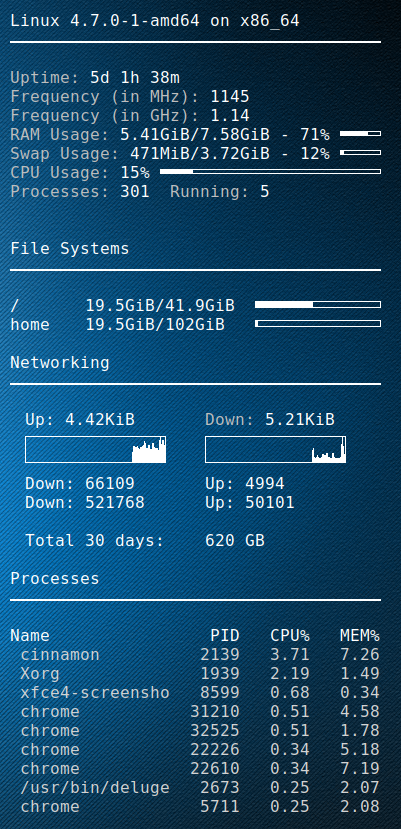
I setup a golang script to fetch the DD-WRT bandwidth usage for the previous 2 months, as well as the last 30 days(rolling).
Using conky then i can display it on my desktop.
My ISP (digiweb), don’t provide any means to check your bandwidth.
Picture at end of post 🙂

Golang DD-WRT script


package main

import (
    "fmt"
    "strconv"
    "net/http"
    "crypto/tls"
    "io/ioutil"
    "regexp"
    "time"
)

// You set these
var _ddwrt_ip = "10.1.1.1"
var _ddwrt_ssl = true
var _ddwrt_port = 443
var _ddwrt_user = "root"
var _ddwrt_pass = "password"

// don't set these
var _ddwrt_this_month = ""
var _ddwrt_last_month = ""

func printmonth(monthyear string) {
    tr := &http.Transport {
        TLSClientConfig: &tls.Config { InsecureSkipVerify: true },
    }

    client := &http.Client { Transport: tr }

    proto := "http"
    if _ddwrt_ssl == true {
      proto = "https"
    }

    req, err := http.NewRequest( "GET", proto + "://" + _ddwrt_ip + ":" + strconv.Itoa( _ddwrt_port ) + "/ttgraph.cgi?" + monthyear, nil )
    req.SetBasicAuth( _ddwrt_user, _ddwrt_pass )

    resp, err := client.Do( req )
    defer resp.Body.Close()

    if err != nil {
        fmt.Printf( "Error : %s", err)
    }

    if resp.StatusCode != 200 {
        fmt.Printf( "Error code: %s", strconv.Itoa( resp.StatusCode ) )
    }

    bodyBytes, err2 := ioutil.ReadAll( resp.Body )
    if err2 != nil {
        fmt.Printf( "Error : %s", err2 )
    }
    
    if len( _ddwrt_this_month ) == 0 {
        _ddwrt_this_month = string( bodyBytes )
    } else {
        _ddwrt_last_month = string( bodyBytes )
    }

    re := regexp.MustCompile( "(?s)<li id=\"label\">(.*?)</li>" )
    matches := re.FindAllString( string( bodyBytes ), -1 )

    rein := regexp.MustCompile( "(?s)Incoming: ([0-9]+)" )
    reinmatches := rein.FindStringSubmatch( matches[0] )

    reout := regexp.MustCompile( "(?s)Outgoing: ([0-9]+)" )
    reoutmatches := reout.FindStringSubmatch( matches[0] )

    fmt.Printf( "${goto 20}Down: %s ${goto 200}Up: %s\n", reinmatches[1], reoutmatches[1] )
}

func parse30days() {
    
    var all = _ddwrt_last_month + _ddwrt_this_month
    
    re := regexp.MustCompile( "(?s)onmouseover=\"Show(.*?)onmouseout" )
    matches := re.FindAllString( all, -1 )
    
    var down int64
    var up int64
    var total int64
    var days30 = 30
    
    for i := len( matches )-1; i >= 0; i-- {
        reinout := regexp.MustCompile( "(?s)Incoming: ([0-9]+) MB / Outgoing: ([0-9]+) MB" )
        inout := reinout.FindStringSubmatch( matches[i] )
        r, _ := strconv.ParseInt( inout[1], 10, 64 )
        
        if r == 0 {
            continue;
        }
        
        down = down + r
        
        t, _ := strconv.ParseInt( inout[2], 10, 64 )
        up = up + t
        
        days30--
        
        if days30 == 0 {
           break;
        }
    }

    
    total = down + up
    fmt.Printf( "\n${goto 20}Total 30 days:${goto 200}%d GB\n", total / 1024 )
}

func main() {
    now := time.Now()
    monthyear := now.Format("01-2006")
    printmonth(monthyear)
    monthyear = now.AddDate(0,-1,0).Format("01-2006")
    printmonth(monthyear)
    parse30days()
}

Conky script Integration


conky.config = {
    alignment = 'top_right',
    background = true,
    border_width = 1,
    cpu_avg_samples = 2,
	default_color = 'white',
    default_outline_color = 'white',
    default_shade_color = 'white',
    draw_borders = false,
    draw_graph_borders = true,
    draw_outline = false,
    draw_shades = false,
    use_xft = true,
    font = 'DejaVu Sans Mono:size=12',
    gap_x = 50,
    gap_y = 50,
    double_buffer = true,
    minimum_height = 5,
	minimum_width = 5,
    net_avg_samples = 2,
    no_buffers = true,
    out_to_console = false,
    out_to_stderr = false,
    extra_newline = false,
    own_window = true,
    own_window_class = 'Conky',
    own_window_type = 'desktop',
    own_window_transparent = true,
    stippled_borders = 0,
    update_interval = 3.0,
    uppercase = false,
    use_spacer = 'none',
    show_graph_scale = false,
    show_graph_range = false
}

conky.text = [[
$sysname $kernel on $machine
${hr 2}

${color grey}Uptime:$color $uptime
${color grey}Frequency (in MHz):$color $freq
${color grey}Frequency (in GHz):$color $freq_g
${color grey}RAM Usage:$color $mem/$memmax - $memperc% ${membar 4}
${color grey}Swap Usage:$color $swap/$swapmax - $swapperc% ${swapbar 4}
${color grey}CPU Usage:$color $cpu% ${cpubar 4}
${color grey}Processes:$color $processes  ${color grey}Running:$color $running_processes


${color}File Systems
${hr 2}

/${goto 80}$color${fs_used /}/${fs_size /} ${goto 250}${fs_bar 6 /}
/home${goto 80}$color${fs_used /}/${fs_size /home} ${goto 250}${fs_bar 6 /home}
 
${color}Networking
${hr 2}

${goto 20}Up:$color ${upspeed wlp3s0} ${goto 200}${color grey}Down:$color ${downspeed wlp3s0}
${goto 20}${upspeedgraph wlp3s0 26,140 FFFFFF FFFFFF}${goto 200}${downspeedgraph wlp3s0 26,140 FFFFFF FFFFFF}
${execpi 3600 /usr/bin/go run /home/dave/.conky/ddwrt-bandwidth.go}

${color}Processes
${hr 2}

Name                PID   CPU%   MEM%
${color lightgrey} ${top name 1} ${top pid 1} ${top cpu 1} ${top mem 1}
${color lightgrey} ${top name 2} ${top pid 2} ${top cpu 2} ${top mem 2}
${color lightgrey} ${top name 3} ${top pid 3} ${top cpu 3} ${top mem 3}
${color lightgrey} ${top name 4} ${top pid 4} ${top cpu 4} ${top mem 4}
${color lightgrey} ${top name 5} ${top pid 5} ${top cpu 5} ${top mem 5}
${color lightgrey} ${top name 6} ${top pid 6} ${top cpu 6} ${top mem 6}
${color lightgrey} ${top name 7} ${top pid 7} ${top cpu 7} ${top mem 7}
${color lightgrey} ${top name 8} ${top pid 8} ${top cpu 8} ${top mem 8}
${color lightgrey} ${top name 9} ${top pid 9} ${top cpu 9} ${top mem 9}

]]

Enjoy
rolling